

MySQL高可用群集之MHA
相比MMM的优势
节约资源,不像MMM还需要再要一台Master服务器,这个可以直接把从服务器备用成主服务器
MHA的工作原理:
1.从宕机崩溃的master保存二进制日志事件(binlog events)
2.识别含有最新更新的slave
3.应用差异的中继日志(relay log)到其他的slave
4.应用从master保存的二进制日志事件(binlog events)
5.提升一个slave为新的master
6.使其他的slave连接新的master进行复制
安装包自带的工具
- Manager工具包主要包括以下几个工具:
masterha_check_ssh:检查MHA的SSH配置状况
masterha_check_repl:检查MySQL复制状况
masterha_manger:启动MHA
masterha_check_status:检测当前MHA运行状态
masterha_master_monitor:检测master是否宕机
masterha_master_switch:控制故障转移(自动或者手动)
masterha_conf_host:添加或删除配置的server信息 - Node工具包(这些工具通常由MHA Manager的脚本触发,无需人为操作)主要包括以下几个工具:
save_binary_logs:保存和复制master的二进制日志
apply_diff_relay_logs:识别差异的中继日志事件并将其差异的事件应用于其他的slave
filter_mysqlbinlog:去除不必要的ROLLBACK事件(MHA已不再使用这个工具)
purge_relay_logs:清除中继日志(不会阻塞SQL线程)
安装配置MHA
★准备工作★
一共需要4台服务器
Manger:192.168.31.110
master:192.168.31.101
slave1:192.168.31.102
slave2:192.168.31.103
配置环境如下图所示:
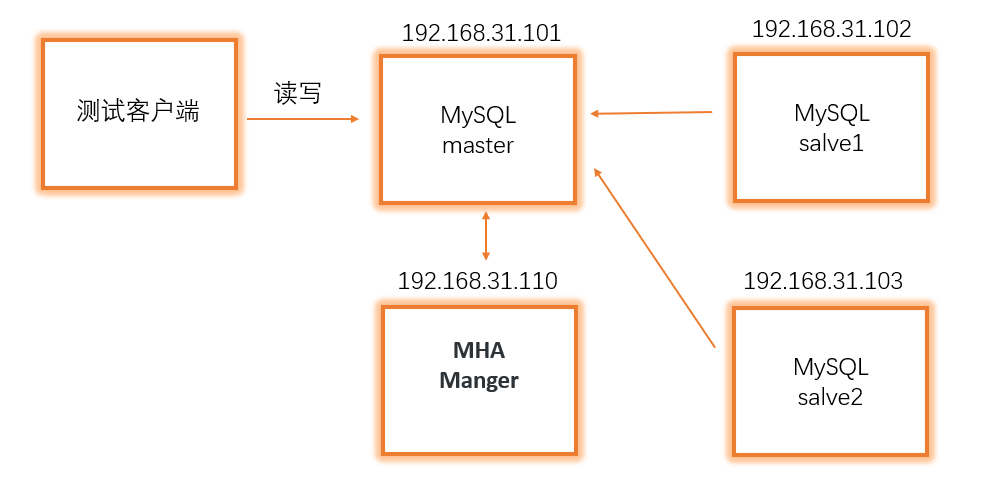
只需要一台服务器来管理,当Master主服务器故障时vip虚拟ip会自动偏移到从服务器上,从服务器会顶当主服务器
先三台服务器安装mysql
全部服务器安装epel源和make工具:
yum install -y epel-release make
yum clean all && yum makecache
需要准备的MHA安装包:
node安装包名:mha4mysql-node-0.56.tar.gz
manger安装包名:mha4mysql-manger-0.56.tar.gz
★开始安装★
1.配置三台mysql服务器主从
注意:3台服务器的server-id这个参数不能一样,其他一样,配置完记得重启服务
vim /etc/my.cnf
------------------------------
server-id = 1
log-bin = mysql-bin
log-slave-updates = true
relay-log = relay-log-bin
relay-log-index = slave-relay-bin.index
master(192.168.31.101):
mysql> show master status;
+-----------------+----------+--------------+------------------+-----------------+
|File             | Position | Binlog_Do_DB | Binlog_Ignore_DB |Executed_Gtid_Set|
+-----------------+----------+--------------+------------------+-----------------+
|mysql-bin.000001 |      448 |              |                  |                 |
+-----------------+----------+--------------+------------------+-----------------+
1 row in set (0.00 sec)

mysql> grant all on *.* to 'myslave'@'192.168.31.%' identified by '123456';
slave(192.168.31.102,192.168.31.103):
注意:这里master_log_file和master_log_pos的值取master的
mysql> change master to master_host='192.168.31.101',master_user='myslave',master_password='123456',master_log_file='mysql-bin.000001',master_log_pos=448;

mysql> grant all on *.* to 'myslave'@'192.168.31.%' identified by '123456';
重启mysql服务之后查看同步状态
slave1(192.168.31.102):
mysql> show slave status\G
*************************** 1. row ***************************
               Slave_IO_State: Waiting for master to send event
                  Master_Host: 192.168.31.101
                  Master_User: myslave
                  Master_Port: 3306
                Connect_Retry: 60
              Master_Log_File: mysql-bin.000001
          Read_Master_Log_Pos: 448
               Relay_Log_File: relay-log-bin.000005
                Relay_Log_Pos: 320
        Relay_Master_Log_File: mysql-bin.000001
             Slave_IO_Running: Yes
            Slave_SQL_Running: Yes
slave2(192.168.31.103):
mysql> show slave status\G
*************************** 1. row ***************************
               Slave_IO_State: Waiting for master to send event
                  Master_Host: 192.168.31.101
                  Master_User: myslave
                  Master_Port: 3306
                Connect_Retry: 60
              Master_Log_File: mysql-bin.000001
          Read_Master_Log_Pos: 448
               Relay_Log_File: relay-log-bin.000004
                Relay_Log_Pos: 320
        Relay_Master_Log_File: mysql-bin.000001
             Slave_IO_Running: Yes
            Slave_SQL_Running: Yes
2.设置免密登录
在四台服务器上都要做其他三台服务器的无密码密钥通信,让每台主机都可以互相无密码密钥进行远程连接
manger(192.168.31.110):
ssh-keygen -t rsa
ssh-copy-id -i /root/.ssh/id_rsa.pub root@192.168.31.101
ssh-copy-id -i /root/.ssh/id_rsa.pub root@192.168.31.102
ssh-copy-id -i /root/.ssh/id_rsa.pub root@192.168.31.103
master(192.168.31.101):
ssh-keygen -t rsa
ssh-copy-id -i /root/.ssh/id_rsa.pub root@192.168.31.110
ssh-copy-id -i /root/.ssh/id_rsa.pub root@192.168.31.102
ssh-copy-id -i /root/.ssh/id_rsa.pub root@192.168.31.103
slave1(192.168.31.102):
ssh-keygen -t rsa
ssh-copy-id -i /root/.ssh/id_rsa.pub root@192.168.31.110
ssh-copy-id -i /root/.ssh/id_rsa.pub root@192.168.31.101
ssh-copy-id -i /root/.ssh/id_rsa.pub root@192.168.31.103
slave2(192.168.31.103):
ssh-keygen -t rsa
ssh-copy-id -i /root/.ssh/id_rsa.pub root@192.168.31.110
ssh-copy-id -i /root/.ssh/id_rsa.pub root@192.168.31.101
ssh-copy-id -i /root/.ssh/id_rsa.pub root@192.168.31.102
3.在所有服务器上都安装MHA依赖环境,就是perl模块(首先需要先安装epel源)
yum install -y perl-DBD-MySQL perl-Config-Tiny perl-Log-Dispatch perl-Parallel-ForkManager perl-ExtUtils-CBuilder perl-ExtUtils-MakeMaker perl-CPAN
4.所有(四台)服务器安装node组件
tar zxvf mha4mysql-node-0.56.tar.gz
cd mha4mysql-node-0.56
perl Makefile.PL && make && make install
5.在MHA-manger主机上安装manger组件
tar zxvf mha4mysql-manger-0.56.tar.gz
cd mha4mysql-manger-0.56
perl Makefile.PL && make && make install
6.MHA-manger主机上配置MHA配置文件
把解压包里面的相关脚本复制到/usr/local/bin目录
复制上述的自动切换时 VIP 管理的脚本到/usr/local/bin目录,这里使用脚本管理VIP,也是推荐的一种方式,生产环境不太建议使用 keepalived,再进行修改
cp -ra samples/scripts /usr/local/bin/
cp /usr/local/bin/scripts/master_ip_failover /usr/local/bin
修改master_ip_failover配置文件
vim /usr/local/bin/master_ip_failover
-----------------------------------------
my (
  $command,        $ssh_user,         $orig_master_host,
  $orig_master_ip, $orig_master_port, $new_master_host,
  $new_master_ip,  $new_master_port,  $new_master_user,
  $new_master_password
);
my $vip = '192.168.31.200/24';
my $key = "1";
my $ssh_start_vip = "/sbin/ifconfig ens33:$key $vip";
my $ssh_stop_vip = "/sbin/ifconfig ens33:$key down";
my $exit_code = 0;
创建目录,从解压包里复制配置文件模板使用修改
mkdir /etc/masterha
cp samples/conf/app1.cnf /etc/masterha/
vim /etc/masterha/app1.cnf
-------------------------------------
[server default]
manager_workdir=/var/log/masterha/app1
manager_log=/var/log/masterha/app1/manager.log
master_binlog_dir=/usr/local/mysql/data
master_ip_failover_script=/usr/local/bin/master_ip_failover
master_ip_online_change_script=/usr/local/bin/master_ip_online_change
password=123456
user=myslave
ping_interval=1
remote_workdir=/tmp
repl_password=123456
repl_user=myslave
secondary_check_script=/usr/local/bin/masterha_secondary_check -s 192.168.31.102 -s 192.168.31.103
shutdown_script=""
ssh_user=root

[server1]
hostname=192.168.31.101
candidate_master=1
check_repl_delay=0

[server2]
hostname=192.168.31.102
candidate_master=1
check_repl_delay=0

[server3]
hostname=192.168.31.103
port=3306
7.使用工具检测配置连接的状况
检查命令:masterha_check_ssh -conf=/etc/masterha/app1.cnf
测试SSH无密码登录,如果正常如下所示:
[root@manger ~]# masterha_check_ssh -conf=/etc/masterha/app1.cnf
Wed Jul  6 23:10:51 2022 - [warning] Global configuration file /etc/masterha_default.cnf not found. Skipping.
Wed Jul  6 23:10:51 2022 - [info] Reading application default configuration from /etc/masterha/app1.cnf..
Wed Jul  6 23:10:51 2022 - [info] Reading server configuration from /etc/masterha/app1.cnf..
Wed Jul  6 23:10:51 2022 - [info] Starting SSH connection tests..
Wed Jul  6 23:10:52 2022 - [debug]
Wed Jul  6 23:10:51 2022 - [debug]  Connecting via SSH from root@192.168.31.101(192.168.31.101:22) to root@192.168.31.102(192.168.31.102:22)..
Wed Jul  6 23:10:51 2022 - [debug]   ok.
Wed Jul  6 23:10:51 2022 - [debug]  Connecting via SSH from root@192.168.31.101(192.168.31.101:22) to root@192.168.31.103(192.168.31.103:22)..
Wed Jul  6 23:10:51 2022 - [debug]   ok.
Wed Jul  6 23:10:52 2022 - [debug]
Wed Jul  6 23:10:51 2022 - [debug]  Connecting via SSH from root@192.168.31.102(192.168.31.102:22) to root@192.168.31.101(192.168.31.101:22)..
Wed Jul  6 23:10:51 2022 - [debug]   ok.
Wed Jul  6 23:10:51 2022 - [debug]  Connecting via SSH from root@192.168.31.102(192.168.31.102:22) to root@192.168.31.103(192.168.31.103:22)..
Wed Jul  6 23:10:52 2022 - [debug]   ok.
Wed Jul  6 23:10:53 2022 - [debug]
Wed Jul  6 23:10:52 2022 - [debug]  Connecting via SSH from root@192.168.31.103(192.168.31.103:22) to root@192.168.31.101(192.168.31.101:22)..
Wed Jul  6 23:10:52 2022 - [debug]   ok.
Wed Jul  6 23:10:52 2022 - [debug]  Connecting via SSH from root@192.168.31.103(192.168.31.103:22) to root@192.168.31.102(192.168.31.102:22)..
Wed Jul  6 23:10:52 2022 - [debug]   ok.
Wed Jul  6 23:10:53 2022 - [info] All SSH connection tests passed successfully.
测试mysql主从连接情况:
检查命令:masterha_check_repl -conf=/etc/masterha/app1.cnf
[root@manger ~]# masterha_check_repl -conf=/etc/masterha/app1.cnf
Wed Jul  6 23:11:10 2022 - [warning] Global configuration file /etc/masterha_default.cnf not found. Skipping.
Wed Jul  6 23:11:10 2022 - [info] Reading application default configuration from /etc/masterha/app1.cnf..
Wed Jul  6 23:11:10 2022 - [info] Reading server configuration from /etc/masterha/app1.cnf..
Wed Jul  6 23:11:10 2022 - [info] MHA::MasterMonitor version 0.56.
Wed Jul  6 23:11:11 2022 - [info] GTID failover mode = 0
Wed Jul  6 23:11:11 2022 - [info] Dead Servers:
Wed Jul  6 23:11:11 2022 - [info] Alive Servers:
Wed Jul  6 23:11:11 2022 - [info]   192.168.31.101(192.168.31.101:3306)
Wed Jul  6 23:11:11 2022 - [info]   192.168.31.102(192.168.31.102:3306)
Wed Jul  6 23:11:11 2022 - [info]   192.168.31.103(192.168.31.103:3306)
Wed Jul  6 23:11:11 2022 - [info] Alive Slaves:
Wed Jul  6 23:11:11 2022 - [info]   192.168.31.102(192.168.31.102:3306)  Version=5.7.36-log (oldest major version between slaves) log-bin:enabled
Wed Jul  6 23:11:11 2022 - [info]     Replicating from 192.168.31.101(192.168.31.101:3306)
Wed Jul  6 23:11:11 2022 - [info]     Primary candidate for the new Master (candidate_master is set)
Wed Jul  6 23:11:11 2022 - [info]   192.168.31.103(192.168.31.103:3306)  Version=5.7.36-log (oldest major version between slaves) log-bin:enabled
Wed Jul  6 23:11:11 2022 - [info]     Replicating from 192.168.31.101(192.168.31.101:3306)
Wed Jul  6 23:11:11 2022 - [info] Current Alive Master: 192.168.31.101(192.168.31.101:3306)
Wed Jul  6 23:11:11 2022 - [info] Checking slave configurations..
Wed Jul  6 23:11:11 2022 - [info]  read_only=1 is not set on slave 192.168.31.102(192.168.31.102:3306).
Wed Jul  6 23:11:11 2022 - [warning]  relay_log_purge=0 is not set on slave 192.168.31.102(192.168.31.102:3306).
Wed Jul  6 23:11:11 2022 - [info]  read_only=1 is not set on slave 192.168.31.103(192.168.31.103:3306).
Wed Jul  6 23:11:11 2022 - [warning]  relay_log_purge=0 is not set on slave 192.168.31.103(192.168.31.103:3306).
Wed Jul  6 23:11:11 2022 - [info] Checking replication filtering settings..
Wed Jul  6 23:11:11 2022 - [info]  binlog_do_db= , binlog_ignore_db=
Wed Jul  6 23:11:11 2022 - [info]  Replication filtering check ok.
Wed Jul  6 23:11:11 2022 - [info] GTID (with auto-pos) is not supported
Wed Jul  6 23:11:11 2022 - [info] Starting SSH connection tests..
Wed Jul  6 23:11:14 2022 - [info] All SSH connection tests passed successfully.
Wed Jul  6 23:11:14 2022 - [info] Checking MHA Node version..
Wed Jul  6 23:11:14 2022 - [info]  Version check ok.
Wed Jul  6 23:11:14 2022 - [info] Checking SSH publickey authentication settings on the current master..
Wed Jul  6 23:11:14 2022 - [info] HealthCheck: SSH to 192.168.31.101 is reachable.
Wed Jul  6 23:11:14 2022 - [info] Master MHA Node version is 0.56.
Wed Jul  6 23:11:14 2022 - [info] Checking recovery script configurations on 192.168.31.101(192.168.31.101:3306)..
Wed Jul  6 23:11:14 2022 - [info]   Executing command: save_binary_logs --command=test --start_pos=4 --binlog_dir=/usr/local/mysql/data --output_file=/tmp/save_binary_logs_test --manager_version=0.56 --start_file=mysql-bin.000001
Wed Jul  6 23:11:14 2022 - [info]   Connecting to root@192.168.31.101(192.168.31.101:22)..
  Creating /tmp if not exists..    ok.
  Checking output directory is accessible or not..
   ok.
  Binlog found at /usr/local/mysql/data, up to mysql-bin.000001
Wed Jul  6 23:11:14 2022 - [info] Binlog setting check done.
Wed Jul  6 23:11:14 2022 - [info] Checking SSH publickey authentication and checking recovery script configurations on all alive slave servers..
Wed Jul  6 23:11:14 2022 - [info]   Executing command : apply_diff_relay_logs --command=test --slave_user='myslave' --slave_host=192.168.31.102 --slave_ip=192.168.31.102 --slave_port=3306 --workdir=/tmp --target_version=5.7.36-log --manager_version=0.56 --relay_log_info=/usr/local/mysql/data/relay-log.info  --relay_dir=/usr/local/mysql/data/  --slave_pass=xxx
Wed Jul  6 23:11:14 2022 - [info]   Connecting to root@192.168.31.102(192.168.31.102:22)..
  Checking slave recovery environment settings..
    Opening /usr/local/mysql/data/relay-log.info ... ok.
    Relay log found at /usr/local/mysql/data, up to relay-log-bin.000005
    Temporary relay log file is /usr/local/mysql/data/relay-log-bin.000005
    Testing mysql connection and privileges..mysql: [Warning] Using a password on the command line interface can be insecure.
 done.
    Testing mysqlbinlog output.. done.
    Cleaning up test file(s).. done.
Wed Jul  6 23:11:15 2022 - [info]   Executing command : apply_diff_relay_logs --command=test --slave_user='myslave' --slave_host=192.168.31.103 --slave_ip=192.168.31.103 --slave_port=3306 --workdir=/tmp --target_version=5.7.36-log --manager_version=0.56 --relay_log_info=/usr/local/mysql/data/relay-log.info  --relay_dir=/usr/local/mysql/data/  --slave_pass=xxx
Wed Jul  6 23:11:15 2022 - [info]   Connecting to root@192.168.31.103(192.168.31.103:22)..
  Checking slave recovery environment settings..
    Opening /usr/local/mysql/data/relay-log.info ... ok.
    Relay log found at /usr/local/mysql/data, up to relay-log-bin.000004
    Temporary relay log file is /usr/local/mysql/data/relay-log-bin.000004
    Testing mysql connection and privileges..mysql: [Warning] Using a password on the command line interface can be insecure.
 done.
    Testing mysqlbinlog output.. done.
    Cleaning up test file(s).. done.
Wed Jul  6 23:11:15 2022 - [info] Slaves settings check done.
Wed Jul  6 23:11:15 2022 - [info]
192.168.31.101(192.168.31.101:3306) (current master)
 +--192.168.31.102(192.168.31.102:3306)
 +--192.168.31.103(192.168.31.103:3306)

Wed Jul  6 23:11:15 2022 - [info] Checking replication health on 192.168.31.102..
Wed Jul  6 23:11:15 2022 - [info]  ok.
Wed Jul  6 23:11:15 2022 - [info] Checking replication health on 192.168.31.103..
Wed Jul  6 23:11:15 2022 - [info]  ok.
Wed Jul  6 23:11:15 2022 - [info] Checking master_ip_failover_script status:
Wed Jul  6 23:11:15 2022 - [info]   /usr/local/bin/master_ip_failover --command=status --ssh_user=root --orig_master_host=192.168.31.101 --orig_master_ip=192.168.31.101 --orig_master_port=3306
Wed Jul  6 23:11:15 2022 - [info]  OK.
Wed Jul  6 23:11:15 2022 - [warning] shutdown_script is not defined.
Wed Jul  6 23:11:15 2022 - [info] Got exit code 0 (Not master dead).

MySQL Replication Health is OK.
补充:可能出现的错误解决方法
- 测试SSH无密码登陆报错
检查是否每台机器都给其他三台主机发送的密钥 - 测试 mysq 主从连接情况报错
如果不是给的所有权限注意3台mysql数据库应该给那些数据库的操作权限,操作权限是否没有给够,少了什么权限
注意检查你的/etc/masterha/app1.cnf配置文件是否是用户和密码设置的跟授权时的不一致
8.开启服务
开启MHA服务:
nohup masterha_manager --conf=/etc/masterha/app1.cnf --remove_dead_master_conf --ignore_last_failover < /dev/null > /var/log/masterha/app1/manager.log 2>&1 &
–remove_dead_master_conf:该参数代表当发生主从切换后,老的主库的 ip 将会从配置文件中移除。
–manger_log:设置日志存放位置
–ignore_last_failover:在缺省情况下,如果 MHA 检测到连续发生宕机,且两次宕机间隔不足 8 小时的话,则不会进行 Failover,之所以这样限制是为了避免 ping-pong 效应。该参数代表忽略上次 MHA 触发切换产生的文件,默认情况下, MHA 发生切换后会在日志记目录,也就是上面设置的日志 app1.failover.complete 文件,下次再次切换的时候如果发现该目录下存在该文件将不允许触发切换,除非在第一次切换后收到删除该文件,为了方便,这里设置为-ignore_last_failover
测试结果
查看状态是否成功:
masterha_check_status --conf=/etc/masterha/app1.cnf
如下所示:
[root@manger ~]# nohup masterha_manager --conf=/etc/masterha/app1.cnf --remove_dead_master_conf --ignore_last_failover < /dev/null > /var/log/masterha/app1/manager.log 2>&1 &
[1] 2002
[root@manger ~]# masterha_check_status --conf=/etc/masterha/app1.cnf
app1 (pid:2002) is running(0:PING_OK), master:192.168.31.101
测试关闭掉主服务器看是否移动到备用master服务器上(查询日志查看状态)
tail -f /var/log/masterha/app1/manager.log
---------------------------------------------------
----- Failover Report -----

app1: MySQL Master failover 192.168.31.101(192.168.31.101:3306) to 192.168.31.102(192.168.31.102:3306) succeeded

Master 192.168.31.101(192.168.31.101:3306) is down!

Check MHA Manager logs at manger:/var/log/masterha/app1/manager.log for details.

Started automated(non-interactive) failover.
Invalidated master IP address on 192.168.31.101(192.168.31.101:3306)
The latest slave 192.168.31.102(192.168.31.102:3306) has all relay logs for recovery.
Selected 192.168.31.102(192.168.31.102:3306) as a new master.
192.168.31.102(192.168.31.102:3306): OK: Applying all logs succeeded.
Failed to activate master IP address for 192.168.31.102(192.168.31.102:3306) with return code 10:0
192.168.31.103(192.168.31.103:3306): This host has the latest relay log events.
Generating relay diff files from the latest slave succeeded.
192.168.31.103(192.168.31.103:3306): OK: Applying all logs succeeded. Slave started, replicating from 192.168.31.102(192.168.31.102:3306)
192.168.31.102(192.168.31.102:3306): Resetting slave info succeeded.
Master failover to 192.168.31.102(192.168.31.102:3306) completed successfully.
可以通过日志看见master节点转移到slave1(192.168.31.102)上了
这个时候登录slave2(192.168.31.103)查看主从状态:
mysql> show slave status\G
*************************** 1. row ***************************
               Slave_IO_State: Waiting for master to send event
                  Master_Host: 192.168.31.102
                  Master_User: myslave
                  Master_Port: 3306
                Connect_Retry: 60
              Master_Log_File: mysql-bin.000003
          Read_Master_Log_Pos: 154
               Relay_Log_File: relay-log-bin.000002
                Relay_Log_Pos: 320
        Relay_Master_Log_File: mysql-bin.000003
             Slave_IO_Running: Yes
            Slave_SQL_Running: Yes
这个时候发现主服务器变成了slave2(192.168.31.102)了,说明成功了
故障恢复
1.配置原来master(192.168.31.101)同步slave2(192.168.31.102)的主从
slave2(192.168.31.102):
mysql> show master status;
+-----------------+----------+--------------+------------------+-----------------+
|File             | Position | Binlog_Do_DB | Binlog_Ignore_DB |Executed_Gtid_Set|
+-----------------+----------+--------------+------------------+-----------------+
|mysql-bin.000003 |      154 |              |                  |                 |
+-----------------+----------+--------------+------------------+-----------------+
1 row in set (0.00 sec)
master(192.168.31.101):
change master to master_host='192.168.31.102',master_user='myslave',master_password='123456',master_log_file='mysql-bin.000003',master_log_pos=154;
重启mysql服务然后查看主从状态:
mysql> show slave status\G
*************************** 1. row ***************************
               Slave_IO_State: Waiting for master to send event
                  Master_Host: 192.168.31.102
                  Master_User: myslave
                  Master_Port: 3306
                Connect_Retry: 60
              Master_Log_File: mysql-bin.000003
          Read_Master_Log_Pos: 154
               Relay_Log_File: relay-log-bin.000006
                Relay_Log_Pos: 367
        Relay_Master_Log_File: mysql-bin.000003
             Slave_IO_Running: Yes
            Slave_SQL_Running: Yes
2.在manger服务器修改/etc/masterha/app1.cnf
更改secondary_check_script=/usr/local/bin/masterha_secondary_check这一行把192.168.31.102改成192.168.31.101,因为现在192.168.31.102是master
添加server1,因为server1挂掉之后就会在配置文件删除
vim /etc/masterha/app1.cnf
-------------------------------
secondary_check_script=/usr/local/bin/masterha_secondary_check -s 192.168.31.101 -s 192.168.31.103
shutdown_script=""
ssh_user=root
user=myslave

[server2]
candidate_master=1
check_repl_delay=0
hostname=192.168.31.102

[server3]
hostname=192.168.31.103
port=3306

[server1]
candidate_master=1
check_repl_delay=0
hostname=192.168.31.101
然后重新启动MHA服务
[root@manger ~]# nohup masterha_manager --conf=/etc/masterha/app1.cnf --remove_dead_master_conf --ignore_last_failover < /dev/null > /var/log/masterha/app1/manager.log 2>&1 &
[1] 2309
[root@manger ~]# masterha_check_status --conf=/etc/masterha/app1.cnf
app1 (pid:2309) is running(0:PING_OK), master:192.168.31.102
[root@manger ~]# tail -f /var/log/masterha/app1/manager.log
Wed Jul  6 23:43:43 2022 - [info] Slaves settings check done.
Wed Jul  6 23:43:43 2022 - [info]
192.168.31.102(192.168.31.102:3306) (current master)
 +--192.168.31.101(192.168.31.101:3306)
 +--192.168.31.103(192.168.31.103:3306)

Wed Jul  6 23:43:43 2022 - [info] Checking master_ip_failover_script status:
Wed Jul  6 23:43:43 2022 - [info]   /usr/local/bin/master_ip_failover --command=status --ssh_user=root --orig_master_host=192.168.31.102 --orig_master_ip=192.168.31.102 --orig_master_port=3306
Wed Jul  6 23:43:43 2022 - [info]  OK.
Wed Jul  6 23:43:43 2022 - [warning] shutdown_script is not defined.
Wed Jul  6 23:43:43 2022 - [info] Set master ping interval 1 seconds.
Wed Jul  6 23:43:43 2022 - [info] Set secondary check script: /usr/local/bin/masterha_secondary_check -s 192.168.31.101 -s 192.168.31.103
Wed Jul  6 23:43:43 2022 - [info] Starting ping health check on 192.168.31.102(192.168.31.102:3306)..
Wed Jul  6 23:43:43 2022 - [info] Ping(SELECT) succeeded, waiting until MySQL doesn't respond..
看见正常启动192.168.31.101和192.168.31.103也成为了slave,故障恢复成功!!!
安装遇到的坑
1.masterha_check_ssh -conf=/etc/masterha/app1.cnf检查主从连接情况时报错
[root@manger ~]# masterha_check_ssh -conf=/etc/masterha/app1.cnf
Wed Jul  6 22:39:00 2022 - [info]   Connecting to root@192.168.31.101(192.168.31.101:22)..
Failed to save binary log: Binlog not found from /usr/local/mysql/date! If you got this error at MHA Manager, please set "master_binlog_dir=/path/to/binlog_directory_of_the_master" correctly in the MHA Manager's configuration file and try again.
 at /usr/local/bin/save_binary_logs line 123.
解决办法:
查看/etc/masterha/app1.cnf文件
检查master_binlog_dir配置项一定要和master的bin-log位置一致
2.masterha_check_ssh -conf=/etc/masterha/app1.cnf检查主从连接情况时报错
[root@manger ~]# masterha_check_ssh -conf=/etc/masterha/app1.cnf
Wed Jul  6 22:48:24 2022 - [info]   /usr/local/bin/master_ip_failover --command=status --ssh_user=root --orig_master_host=192.168.31.101 --orig_master_ip=192.168.31.101 --orig_master_port=3306
Bareword "FIXME_xxx" not allowed while "strict subs" in use at /usr/local/bin/master_ip_failover line 98.
Execution of /usr/local/bin/master_ip_failover aborted due to compilation errors.
Wed Jul  6 22:48:24 2022 - [error][/usr/local/share/perl5/MHA/MasterMonitor.pm, ln226]  Failed to get master_ip_failover_script status with return code 255:0.
Wed Jul  6 22:48:24 2022 - [error][/usr/local/share/perl5/MHA/MasterMonitor.pm, ln424] Error happened on checking configurations.  at /usr/local/bin/masterha_check_repl line 48.
Wed Jul  6 22:48:24 2022 - [error][/usr/local/share/perl5/MHA/MasterMonitor.pm, ln523] Error happened on monitoring servers.
Wed Jul  6 22:48:24 2022 - [info] Got exit code 1 (Not master dead).

MySQL Replication Health is NOT OK!
解决方法:
修改master_ip_failover脚本
先解释下这个master_ip_failover脚本。这东西是mha4mysql-manager-0.55.tar.gz源码包里给的一个脚本,可以拿来用,但是要做一下修改。
做测试的时候尽量还是关了防火墙。否则各种找事儿(阻止了3306端口,虽然可以手动开放但是还是直接关了)
vim /usr/local/bin/master_ip_failover
-----------------------------------------
## Update master ip on the catalog database, etc
#FIXME_xxx;
注释掉FIXME_xxx;大概在100行的位置