

Harbor镜像仓库
什么是Harbor?
Docker官方也提供了公共的镜像仓库,但是从安全和效率等方面考虑,部署我们私有环境内的Registry,所以Harbor就是一个私有的docker镜像仓库服务安装配置Harbor
1.安装docker
1.配置docker的yum源
yum install -y yum-utils
yum-config-manager --add-repo http://mirrors.aliyun.com/docker-ce/linux/centos/docker-ce.repo
2.搜索docker版本并安装、启动
#搜索版本号
yum list docker-ce --showduplicates | sort -r
yum -y install docker-ce-20.10.9
#启动docker服务
systemctl start docker
2.安装docker-compose
docker的20.10.9需要1.18.0+版本的docker-compose支持
wget https://github.com/docker/compose/releases/download/v2.5.0/docker-compose-linux-x86_64 -O /usr/local/bin/docker-compose
chmod +x /usr/local/bin/docker-compose
添加可执行权限,查看版本
[root@harbor ~]# docker-compose version
docker-compose version 1.18.0, build 8dd22a9
docker-py version: 2.6.1
CPython version: 2.7.13
OpenSSL version: OpenSSL 1.0.1t  3 May 2016
3.安装harbor镜像仓库
下载harbor安装包
wget https://github.com/goharbor/harbor/releases/download/v2.5.1/harbor-online-installer-v2.5.1.tgz
解压创建工作目录
tar zxf harbor-online-installer-v2.5.1.tgz
mv harbor /harbor
配置配置文件,有模板可以复制来用
cp /harbor/harbor.yml.tmpl /harbor/harbor.yml
vim /harbor/harbor.yml
---------------------------------
hostname: 192.168.31.102
http:
  port: 80
#https:
#  port: 443
#  certificate: /your/certificate/path
#  private_key: /your/private/key/path
harbor_admin_password: Harbor12345
database:
  password: root123
  max_idle_conns: 100
  max_open_conns: 900
data_volume: /data
trivy:
  ignore_unfixed: false
  skip_update: false
  offline_scan: false
  insecure: false
jobservice:
  max_job_workers: 10
notification:
  webhook_job_max_retry: 10
chart:
  absolute_url: disabled
log:
  level: info
  local:
    rotate_count: 50
    rotate_size: 200M
    location: /var/log/harbor
_version: 2.5.0
proxy:
  http_proxy:
  https_proxy:
  no_proxy:
  components:
    - core
    - jobservice
    - trivy
upload_purging:
  enabled: true
  age: 168h
  interval: 24h
  dryrun: false
运行准备安装脚本和安装脚本
cd /harbor
./prepare
./install
看到成功字样则安装成功
[root@harbor harbor]# ./prepare
prepare base dir is set to /harbor
WARNING:root:WARNING: HTTP protocol is insecure. Harbor will deprecate http protocol in the future. Please make sure to upgrade to https
Generated configuration file: /config/portal/nginx.conf
Generated configuration file: /config/log/logrotate.conf
Generated configuration file: /config/log/rsyslog_docker.conf
Generated configuration file: /config/nginx/nginx.conf
Generated configuration file: /config/core/env
Generated configuration file: /config/core/app.conf
Generated configuration file: /config/registry/config.yml
Generated configuration file: /config/registryctl/env
Generated configuration file: /config/registryctl/config.yml
Generated configuration file: /config/db/env
Generated configuration file: /config/jobservice/env
Generated configuration file: /config/jobservice/config.yml
loaded secret from file: /data/secret/keys/secretkey
Generated configuration file: /compose_location/docker-compose.yml
Clean up the input dir
[root@harbor harbor]# ./install.sh
[Step 0]: checking if docker is installed ...

Note: docker version: 20.10.17

[Step 1]: checking docker-compose is installed ...

Note: docker-compose version: 1.18.0

[Step 2]: preparing environment ...

[Step 3]: preparing harbor configs ...
prepare base dir is set to /harbor
WARNING:root:WARNING: HTTP protocol is insecure. Harbor will deprecate http protocol in the future. Please make sure to upgrade to https
Clearing the configuration file: /config/portal/nginx.conf
Clearing the configuration file: /config/log/logrotate.conf
Clearing the configuration file: /config/log/rsyslog_docker.conf
Clearing the configuration file: /config/nginx/nginx.conf
Clearing the configuration file: /config/core/env
Clearing the configuration file: /config/core/app.conf
Clearing the configuration file: /config/registry/passwd
Clearing the configuration file: /config/registry/config.yml
Clearing the configuration file: /config/registryctl/env
Clearing the configuration file: /config/registryctl/config.yml
Clearing the configuration file: /config/db/env
Clearing the configuration file: /config/jobservice/env
Clearing the configuration file: /config/jobservice/config.yml
Generated configuration file: /config/portal/nginx.conf
Generated configuration file: /config/log/logrotate.conf
Generated configuration file: /config/log/rsyslog_docker.conf
Generated configuration file: /config/nginx/nginx.conf
Generated configuration file: /config/core/env
Generated configuration file: /config/core/app.conf
Generated configuration file: /config/registry/config.yml
Generated configuration file: /config/registryctl/env
Generated configuration file: /config/registryctl/config.yml
Generated configuration file: /config/db/env
Generated configuration file: /config/jobservice/env
Generated configuration file: /config/jobservice/config.yml
loaded secret from file: /data/secret/keys/secretkey
Generated configuration file: /compose_location/docker-compose.yml
Clean up the input dir

[Step 4]: starting Harbor ...
Creating network "harbor_harbor" with the default driver
Pulling log (goharbor/harbor-log:v2.5.1)...
v2.5.1: Pulling from goharbor/harbor-log
952860b5285f: Already exists
d11394b4a0a8: Pull complete
f4b5ba876773: Pull complete
576bccf5edcd: Pull complete
c7f5f2960f86: Pull complete
f33a3fc886ed: Pull complete
2420a4975b5d: Pull complete
50009e979dad: Pull complete
Digest: sha256:3461c6d0d3a5e5d368f776e3ab5e87a991449d3756ee4f54c4d4d01040176820
Status: Downloaded newer image for goharbor/harbor-log:v2.5.1
Pulling postgresql (goharbor/harbor-db:v2.5.1)...
v2.5.1: Pulling from goharbor/harbor-db
952860b5285f: Already exists
1c7685d047f5: Pull complete
67f21e440c83: Pull complete
c841e0aecc52: Pull complete
a59c77cb25c2: Pull complete
20d917b3aa5d: Pull complete
a390c817e871: Pull complete
044fe5fec349: Pull complete
e57cb80a9d35: Pull complete
d369efeacbca: Pull complete
44f88800edd7: Pull complete
04396d2861de: Pull complete
b4656c999474: Pull complete
Digest: sha256:96cdd716cf00e5bdc9378ece8b2cd2312807bba047901ba65b2700d1e52f6424
Status: Downloaded newer image for goharbor/harbor-db:v2.5.1
Pulling redis (goharbor/redis-photon:v2.5.1)...
v2.5.1: Pulling from goharbor/redis-photon
952860b5285f: Already exists
ed18963af701: Pull complete
3ef51b0d3377: Pull complete
189605c1d7b4: Pull complete
f697e8cf9540: Pull complete
Digest: sha256:726084bbebbbb7dc26515f468ea08a8647598905bb2e274a2b288e7cb68aedcd
Status: Downloaded newer image for goharbor/redis-photon:v2.5.1
Pulling portal (goharbor/harbor-portal:v2.5.1)...
v2.5.1: Pulling from goharbor/harbor-portal
952860b5285f: Already exists
bd7659fe63da: Pull complete
eab0148e9d06: Pull complete
3d922918ab54: Pull complete
Digest: sha256:e78edc16ebbb8fa1ebcc9934924aa78fd70ef841715cd493b9a9a1f7aeb4b961
Status: Downloaded newer image for goharbor/harbor-portal:v2.5.1
Pulling registry (goharbor/registry-photon:v2.5.1)...
v2.5.1: Pulling from goharbor/registry-photon
952860b5285f: Already exists
af2d4216418e: Pull complete
dc3ef7aba937: Pull complete
040fa3d1da79: Pull complete
b3938a42eb69: Pull complete
70dbb7d0da7f: Pull complete
Digest: sha256:c4afc209427994af6a84fc6d885042a62260ba9754c8acd44495c0b121cf7012
Status: Downloaded newer image for goharbor/registry-photon:v2.5.1
Pulling core (goharbor/harbor-core:v2.5.1)...
v2.5.1: Pulling from goharbor/harbor-core
952860b5285f: Already exists
878ceef07fa7: Pull complete
5964165a27c3: Pull complete
7d46991335f2: Pull complete
4ee5e6fad510: Pull complete
33c8cb29e1f6: Pull complete
6b35ebd7f013: Pull complete
edc4291c49cf: Pull complete
1c9dd96dbe0e: Pull complete
51c64fe9f619: Pull complete
Digest: sha256:75fc3aea93b5e999d2d05f863f49176418167df5db713084894e3561916c0b8a
Status: Downloaded newer image for goharbor/harbor-core:v2.5.1
Pulling jobservice (goharbor/harbor-jobservice:v2.5.1)...
v2.5.1: Pulling from goharbor/harbor-jobservice
952860b5285f: Already exists
e89ff5e9dca3: Pull complete
c80a7826a4f4: Pull complete
6f5f7355d796: Pull complete
d20249fb6679: Pull complete
d051abf86b41: Pull complete
Digest: sha256:c9c7e3fec69346ab00a7b75191737df23ab9e7b7db8c43cc48ed24009f90842e
Status: Downloaded newer image for goharbor/harbor-jobservice:v2.5.1
Pulling proxy (goharbor/nginx-photon:v2.5.1)...
v2.5.1: Pulling from goharbor/nginx-photon
952860b5285f: Already exists
b15a97d4f753: Pull complete
Digest: sha256:2805e043ddad0f668abb999eaa15538dab0b9097770921749aff52b5ef37b360
Status: Downloaded newer image for goharbor/nginx-photon:v2.5.1
Pulling registryctl (goharbor/harbor-registryctl:v2.5.1)...
v2.5.1: Pulling from goharbor/harbor-registryctl
952860b5285f: Already exists
Creating harbor-log ... done
0136b83d21e2: Pull complete
9e9b36184a0c: Pull complete
f53e315cb43f: Pull complete
1467670a623f: Pull complete
Creating redis ... done
Creating harbor-core ... done
Status: Downloaded newer image for goharbor/harbor-registryctl:v2.5.1
Creating nginx ... done
Creating registryctl ...
Creating harbor-portal ...
Creating harbor-db ...
Creating registry ...
Creating redis ...
Creating harbor-core ...
Creating harbor-jobservice ...
Creating nginx ...
✔ ----Harbor has been installed and started successfully.----
因为没有配置https模式,所以会有警告,可以不用管
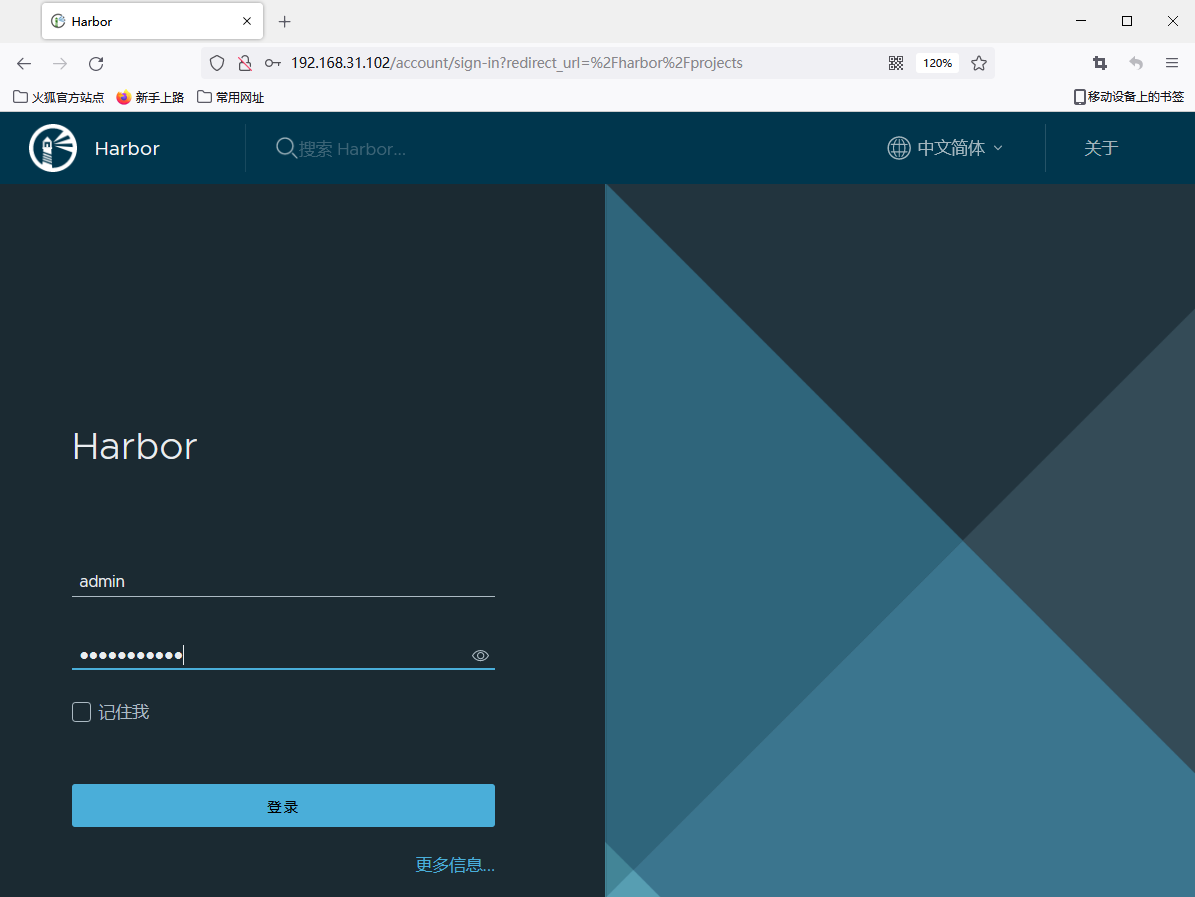
根据配置文件访问192.168.31.102的80端口,用户名为admin,密码为配置文件配置的harbor_admin_password项的值(如下图所示)
配置https方式
注意:该步骤在执行准备脚本和安装脚本前
1.创建https证书
# 创建文件夹并进入
mkdir /harbor/cert && cd /harbor/cert
# 创建证书
openssl genrsa -out ca.key 2048
openssl req -x509 -new -nodes -key ca.key -subj "/CN=xiaojinran.win" -days 365 -out ca.crt
openssl genrsa -out server.key 2048
openssl req -new -nodes -key server.key -subj "/CN=xiaojinran.com" -out server.csr
echo subjectAltName = IP:192.168.31.102 > extfile.cnf
openssl x509 -req -in server.csr -CA ca.crt -CAkey ca.key -CAcreateserial -extfile extfile.cnf -out server.crt -days 365
2.修改harbor.yml中的https证书路径以及端口
vim /harbor/harbor.yml
-------------------------------
https:
  port: 443
  certificate: /harbor/cert/server.crt
  private_key: /harbor/cert/server.key
上传镜像
先登录harbor镜像仓库创建项目
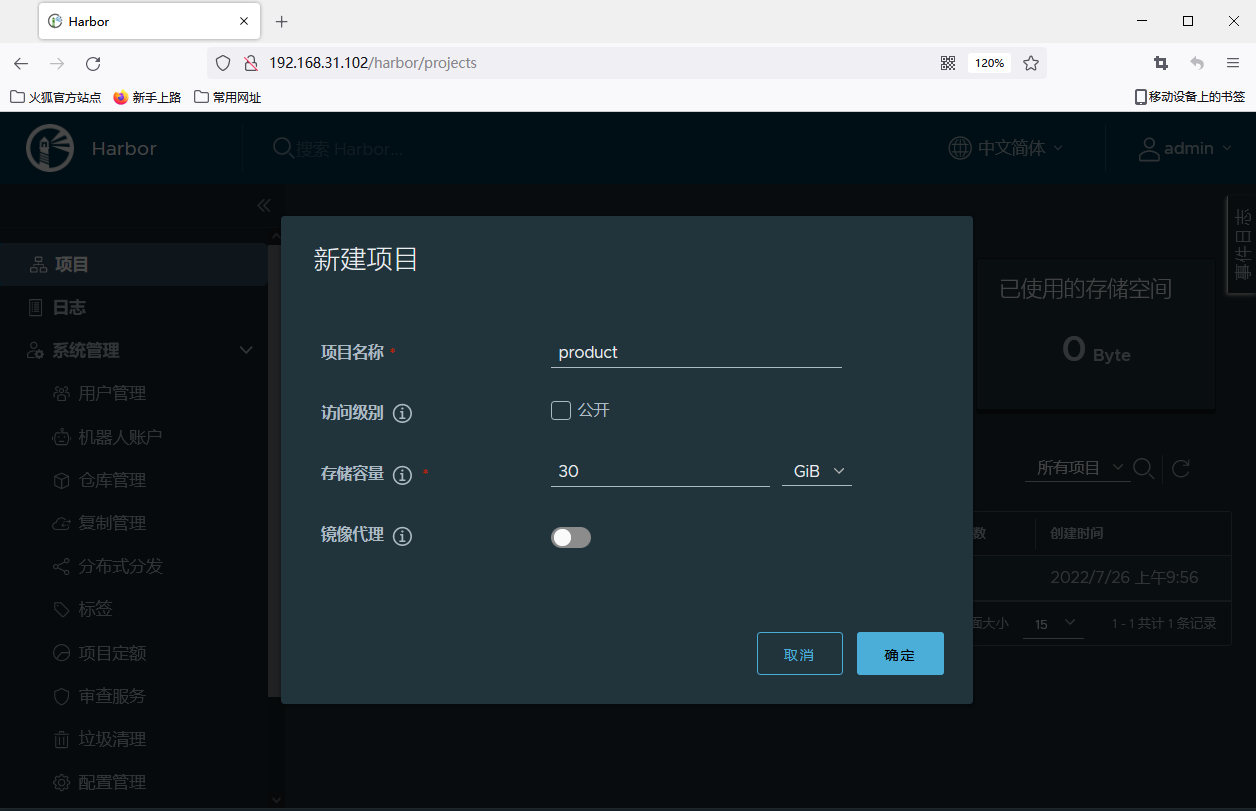
修改docker镜像的tag,格式为仓库地址/项目名/镜像名:tag名(如下所示)
docker tag halo:1.5.4 192.168.31.102/product/halo:1.5.4
登录镜像仓库上传镜像,http方式需要地址上加上http头
docker login http://192.168.31.102 -u admin -p Harbor12345
docker push 192.168.31.102/product/halo:1.5.4