haproxy负载均衡服务
★准备工作★
一共需要三台服务器
hapoxy服务器:192.168.31.101
nginx1服务器:192.168.31.102
nginx2服务器:192.168.31.103
两台nginx的网页内容为:
nginx1(192.168.31.102):
[root@nginx1 ~]# cat /usr/share/nginx/html/index.html
<html>
<h2>Welcome to Hapoxy test!!!</h2>
this is wwww.aaa.com
</html>
nginx2(192.168.31.103):
[root@nginx2 ~]# cat /usr/share/nginx/html/index.html
<html>
<h2>Welcome to Hapoxy test!!!</h2>
this is wwww.bbb.com
</html>
需要准备lua和hapoxy安装包
lua安装包:lua-5.3.5.tar.gz
hapoxy安装包:haproxy-2.3.2.tar.gz
安装配置haproxy
1.安装工具和依赖包
yum -y install gcc gcc-c++ glibc glibc-devel pcre pcre-devel openssl openssl-devel systemd-devel iotop bc zlib-devel lrzsz tree screen
yum -y install libevent-devel.x86_64  ncurses-devel.x86_64  readline-devel.x86_64 libtermcap-devel
2.安装lua
tar zxf lua-5.3.5.tar,gz
cd lua-5.3.5 && make linux test
查看lua版本
[root@hapoxy ~]# lua -v
Lua 5.3.5  Copyright (C) 1994-2018 Lua.org, PUC-Rio
3.编译安装haproxy
tar zxf haproxy-2.3.2.tar.gz
cd haproxy-2.3.2 && make TARGET=linux-glibc LUA_INC=/root/lua-5.3.5/src/  LUA_LIB=/root/lua-5.3.5/src/ PREFIX=/usr/local/haproxy && make install PREFIX=/usr/local/haproxy
4.优化脚本路径
ln -s /usr/local/haproxy/sbin/haproxy /usr/sbin/
5.创建haproxy工作目录
mkdir -p /var/lib/haproxy /etc/haproxy
6.创建编辑haproxy配置文件
vim /etc/haproxy/haproxy.cfg
---------------------------------------
global

    maxconn 30000                              #最大连接数
    chroot /usr/local/haproxy                   #锁定工作目录(安全)
    stats socket /var/lib/haproxy/haproxy.sock mode 600 level admin   #sock文件
    uid 188                             #指定用户uid
    gid 188                             #指定用户gid
    daemon                       #以守护进程方式运行
    nbproc 2    #开启多进程工作模式,推荐使用多进程单线程,除非服务器只有1核CPU
    pidfile /var/run/haproxy.pid
    log 127.0.0.1 local3 info                #日志收集,最多设置2个
     spread-checks 5                  #后端server状态检测提前或延迟(百分比)
    defaults
      option http-keep-alive    #开启与客户端会话保持
      option forwardfor     #透传客户端真实IP到后端服务器
      option redispatch   #server id对应的服务器挂掉,强制定向到健康的服务器
      maxconn 3000            #单进程最大连接数
      mode http                             #工作类型
      #retries 3           #3次连接失败就认为服务不可用,也可以通过后面设置
      #balance roundrobin            #默认的负载均衡的方式,轮询方式
      timeout  http-keep-alive 120s #session会话保持时间,范围内会转到相同后端服务器
      timeout connect 1000ms  #客户请求到后端server最长连接等待时间(TCP握手前)
      timeout client 600ms  #客户请求从到后端server的请求处理超时时长(TCP握手后)
      timeout server 600ms     #haproxy与客户端的最长非活动时间
      timeout check 5s    #对后端服务器的默认检测超时时间
    listen status
        mode http
        bind 0.0.0.0:9999
        stats enable
        log global
        #stats hide-version            #隐藏统计页面dd上的HAproxy版本信息
        stats uri /status
        stats auth admin:admin
    listen web_port
        bind 0.0.0.0:80
        mode http
        log global
        server web1 192.168.31.102:80 check inter 3000 fall 2 rise 5
        server web2 192.168.31.103:80 check inter 3000 fall 2 rise 5
#间隔3s,失败次数2次确认失败,探测连续成功次数为5次确认为成功,共耗时15s
7.复制启动脚本加到systemctl
cp haproxy-2.3.2/examples/haproxy.init /etc/init.d/haproxy
chmod +x /etc/init.d/haproxy
8.启动haproxy服务
启动命令:/etc/init.d/haproxy restart
[root@hapoxy ~]# /etc/init.d/haproxy restart
Restarting haproxy (via systemctl):                        [  OK  ]
[root@hapoxy ~]# systemctl status haproxy
● haproxy.service - SYSV: HA-Proxy is a TCP/HTTP reverse proxy which is particularly suited for high availability environments.
   Loaded: loaded (/etc/rc.d/init.d/haproxy; bad; vendor preset: disabled)
   Active: active (running) since Thu 2022-07-07 02:21:51 EDT; 5s ago
     Docs: man:systemd-sysv-generator(8)
  Process: 17301 ExecStart=/etc/rc.d/init.d/haproxy start (code=exited, status=0/SUCCESS)
 Main PID: 17312 (haproxy)
   CGroup: /system.slice/haproxy.service
           ├─17312 /usr/sbin/haproxy -D -f /etc/haproxy/haproxy.cfg -p /var/run/haproxy.pid
           └─17313 /usr/sbin/haproxy -D -f /etc/haproxy/haproxy.cfg -p /var/run/haproxy.pid

Jul 07 02:21:51 hapoxy haproxy[17301]: Starting haproxy: [WARNING] 187/022151 (17310) : nbproc is deprecated!
Jul 07 02:21:51 hapoxy haproxy[17301]: | For suffering many limitations, the 'nbproc' directive is now deprecated
Jul 07 02:21:51 hapoxy haproxy[17301]: | and scheduled for removal in 2.5. Just comment it out: haproxy will use
Jul 07 02:21:51 hapoxy haproxy[17301]: | threads and will run on all allocated processors. You may also switch to
Jul 07 02:21:51 hapoxy haproxy[17301]: | 'nbthread 2' to keep the same number of processors. If you absolutely
Jul 07 02:21:51 hapoxy haproxy[17301]: | want to run in multi-process mode, you can silence this warning by adding
Jul 07 02:21:51 hapoxy haproxy[17301]: | 'nbthread 1', but then please report your use case to developers.
Jul 07 02:21:51 hapoxy haproxy[17301]: [WARNING] 187/022151 (17310) : Proxy 'status': in multi-process mode, stats will be limited to proces... request.
Jul 07 02:21:51 hapoxy haproxy[17301]: [  OK  ]
Jul 07 02:21:51 hapoxy systemd[1]: Started SYSV: HA-Proxy is a TCP/HTTP reverse proxy which is particularly suited for high availability environments..
Hint: Some lines were ellipsized, use -l to show in full.
测试结果
1.通过访问192.168.31.101调用192.168.31.102和192.168.31.103的web页面(如下图)


发现刷新页面之后切换了网页,说明成功部署!!!
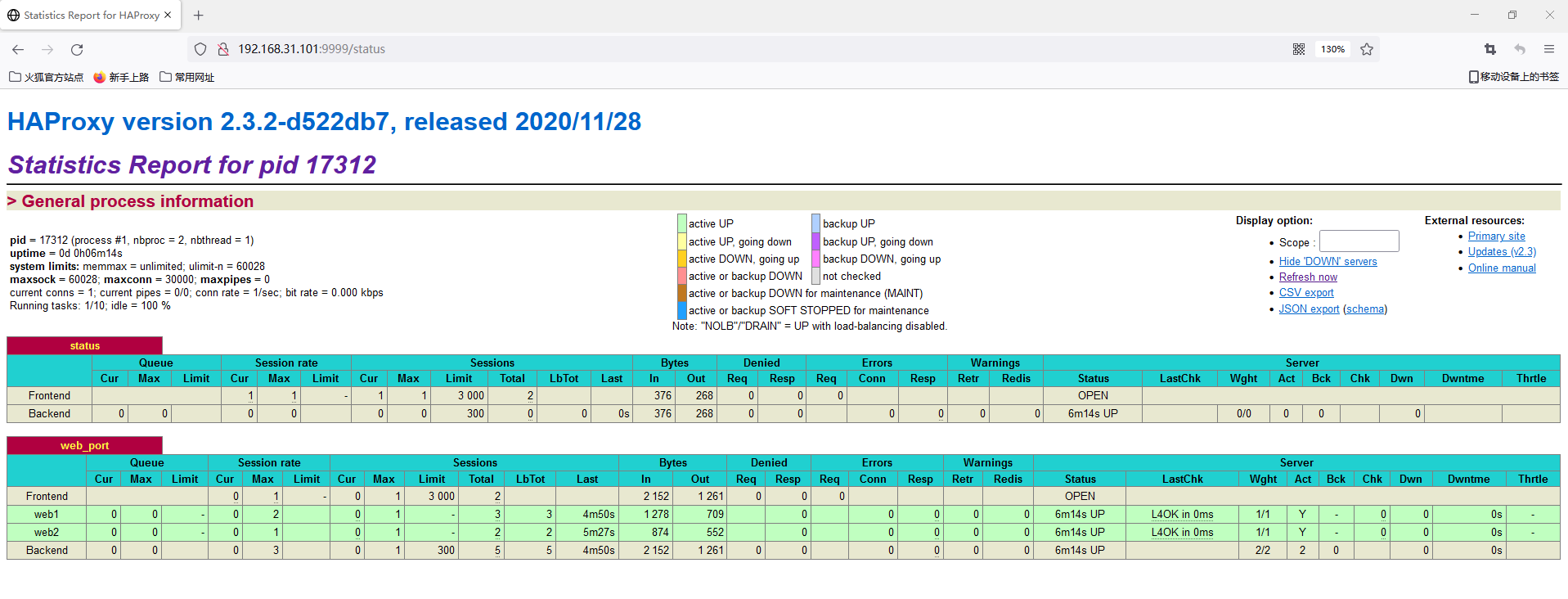
2.通过配置文件配置的网页查看调配的服务器健康情况
访问192.168.31.101:9999/status查看(如下图所示)

这里的网页后缀名以及用户名和密码看配置文件设置的stats选项